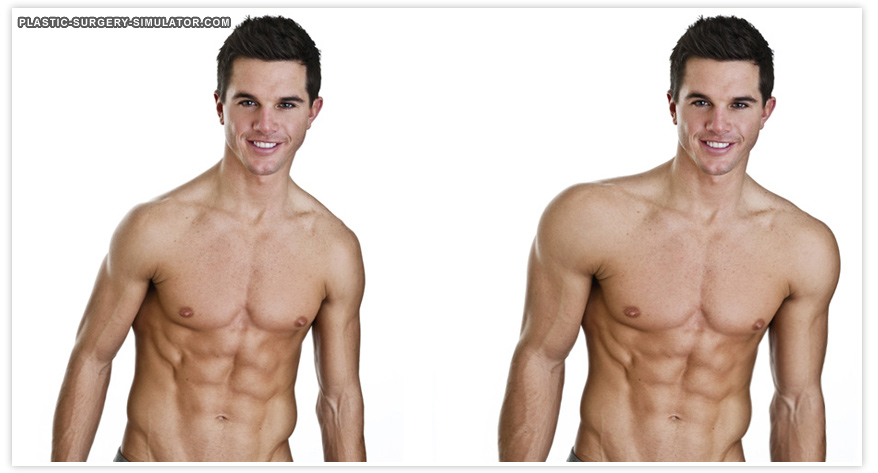
Muscle augmentation and definition simulation
Add volume to pectorals, arms or calves with Grow, and sharpen contours with Push, for implant and high-definition body contouring consultations.
Muscle definition in three steps
Add volume
Click with Grow over each muscle group, symmetrically.
Sharpen contours
Use short Push strokes to define borders.
Compare
Review the change in Comparison and Animate.
Tips from practice
- Small, symmetrical steps keep the result anatomically plausible.
- Use Comparison to show original and simulation side by side, and Animate to morph between them.
Unlimited, on your computer
Reshaping tools run locally, offline if you like, with no per-image fee. The patient's photo never leaves your computer, and the original is never modified.
- Undo, Redo and the Reconstruct brush to correct any area
- Save, print or share with your practice watermark
- Export the before-and-after morph as an MP4 video
Muscle definition simulation: questions
Does reshaping change the patient's skin texture?
Reshaping moves the photograph's own skin instead of painting new skin, so pores, freckles, lighting and skin texture stay those of the patient. The original photograph is never modified: it stays one click away in the Original and Comparison tabs.
Simulate muscle definition on your own patient photos.
Download the complete software and simulate for seven days. No account, no credit card, nothing to cancel. Buy a key from the app or here when you are ready.